One mobile app for iPhone, Android and the web
One build runs everywhere, we handle the App Store, and every tap and animation is tuned by hand.
Apps we have built for clients include Upkeep and R3.
Updated 9 November 2026


iPhone. Android. Web. One build.
One app, one codebase and one team to call. You pay for one build, not three, and every update reaches every platform together.
See the Upkeep app
Haptics on every tap.
A small, precise tick in your hand when you press, swipe or confirm, and animations tuned one by one, not left on default.

App Store ready. We publish it.
Store listing text, screenshots, builds and submission, and the review feedback handled for you, on the App Store and Google Play.

Built for your systems.
Your app talks to your software, payments and AI agents, like the Upkeep assistant that writes up a repair request by voice.
See Upkeep
What is a hybrid mobile app?
A hybrid, or cross-platform, app is built once and runs on iPhone, Android and the web. We write one codebase, using Flutter, instead of three separate apps. You pay for one build, test one product and ship updates to every platform at the same time, while the app still feels at home on each phone.
- One codebase, written once, runs on iPhone, Android and the web.
- You pay for one build and test one product, not three.
- Updates reach every platform at the same time.
- It still feels at home on each phone: Flutter draws the interface itself, and we add the phone's own features.
- Honest limit: very specialised hardware features may need a little extra platform code.
What do you get?
You get one app that runs on iPhone, Android and the web from the same code, ready for the App Store and Google Play. We design it, build it, connect it to your systems, publish it and keep it working afterwards. Haptics on every tap and hand-tuned animations come with every build, not as an extra.
- One app that runs on iPhone, Android and web from the same code, so you do not pay for three builds.
- App Store ready: we prepare the listing, screenshots and builds, and handle publishing to the App Store and Google Play.
- Haptic feedback on every tap, so the app answers your finger the way a good native app does.
- Hand-tuned animations: transitions and small motions designed and adjusted one by one, not default settings.
- A connection to your business software and AI agents, so orders, bookings and messages match your dashboard.
- Payments (cards, Apple Pay, Google Pay where scoped), bookings and calendar, chat and push notifications.
- Camera, voice and AI features on the phone, like the voice assistant in Upkeep.
- Updates after launch: we keep it working as iOS and Android change.
Is a hybrid app as good as a native app?
For most business apps, yes. Flutter draws the interface itself at native speed, so scrolling and animation stay smooth, and we add phone features like haptics, camera and push notifications. Very specialised hardware features may need a little extra platform-specific code. We tell you honestly during planning if your idea needs that.
| Separate iPhone, Android and web apps | One hybrid app | |
|---|---|---|
| Codebases | Three, one per platform | One for all three |
| What you pay for | Three builds | One build |
| Testing | Three products to test | One product to test |
| Updates | Released separately | Released everywhere together |
| Feel on the phone | Native | Native feel, with haptics and tuned animation |
| Very specialised hardware | Easiest | May need a little extra platform code |
How do we make every tap feel right?
Every tap has haptic feedback, the small, precise vibration you feel when you press, swipe or confirm. We also tune transitions and small motions one by one instead of leaving default settings. The result is an app that answers your finger quickly and feels finished, the way the best apps on your phone do.
- Haptic feedback on every tap, swipe and confirm, so the app answers your finger.
- Transitions and small motions designed and adjusted one by one.
- Look, motion and haptics planned together in the design step, on real phone sizes.
- Tested on real phones with real taps, not only in a simulator.
How do we build a mobile app?
We build an app in seven steps: a free call and sketch, wireframes for every screen, design of look, motion and haptics, one build for all platforms, testing on real phones, publishing to the stores, and ongoing improvement. Every screen is drawn and approved before any code is written, and we stay on after launch.
- Free call and sketch.What the app should do for your customers and your team.
- Wireframes.Every screen drawn and approved before code.
- Design.Look, motion and haptics planned together, on real phone sizes.
- Build once.One Flutter codebase for iPhone, Android and web, connected to your backend.
- Test on real phones.Real devices, real data, real taps.
- Publish.We prepare and submit to the App Store and Google Play and handle review feedback.
- Run and improve.Fixes, updates and new features after launch.
Which apps have we built?
We have designed and built apps for a restoration business, online therapy, AI video creation, plant care, car rental, a smart alarm and an AI agent team. Upkeep and R3 have case studies you can read.
Service business app
Upkeep. Orders, payments and shipping for a repair business.
Read the case study →
AI voice assistant in the app
Upkeep AI. Customers talk to it by voice or text, and it writes up their repair request.
Read the case study →
Online therapy app
Sikee. Online therapy: booking, video sessions and journals.

AI video creator
AI Creator. Talking AI twin videos and ads from a prompt.

AI plant care app
UrbanBloom. Plant identification, diagnosis and care reminders.

Instagram profile scanner
InScan. Scores an Instagram profile and says what to fix.
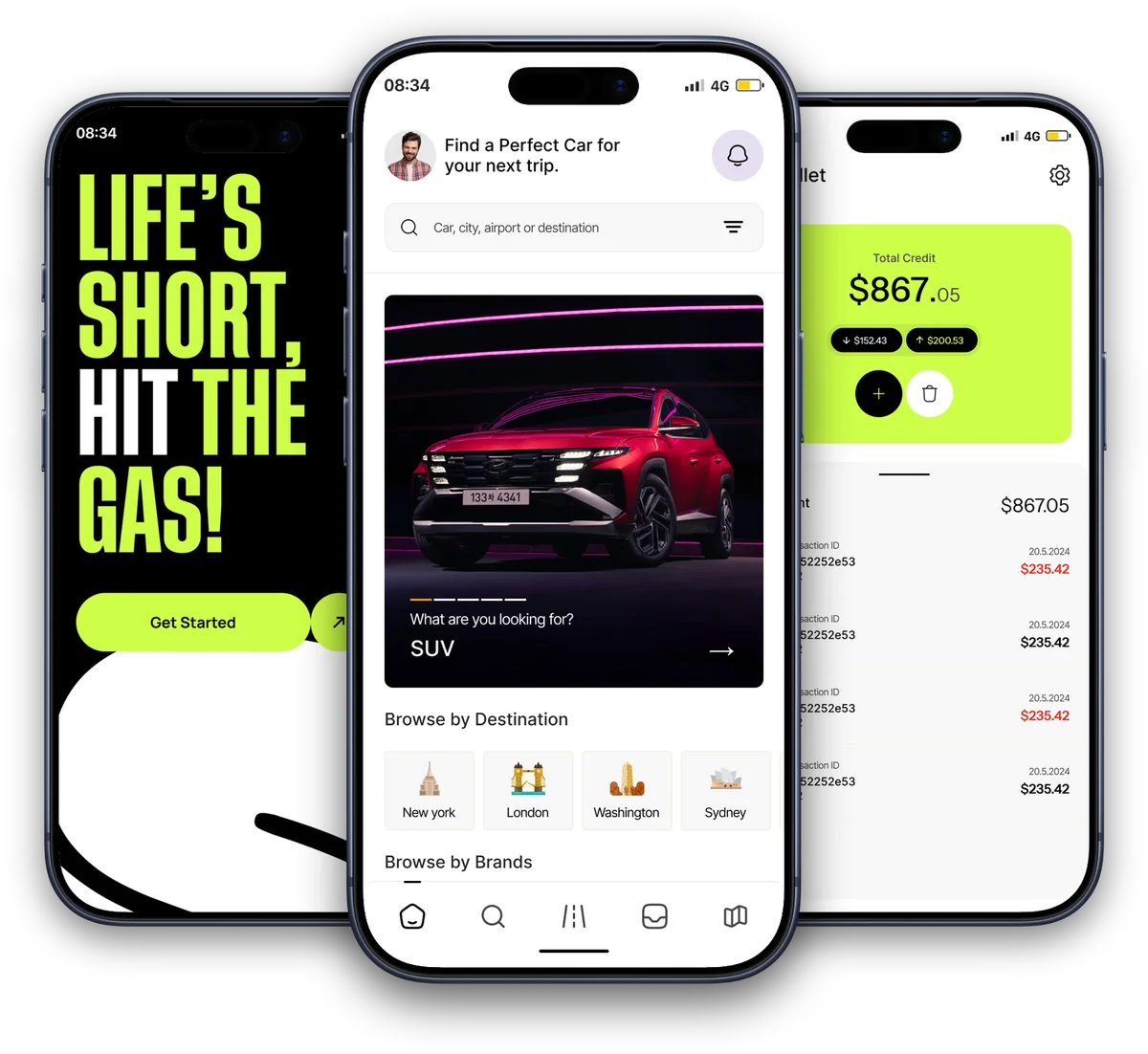
Car rental marketplace
Armada. Car rental marketplace, renter and host apps.
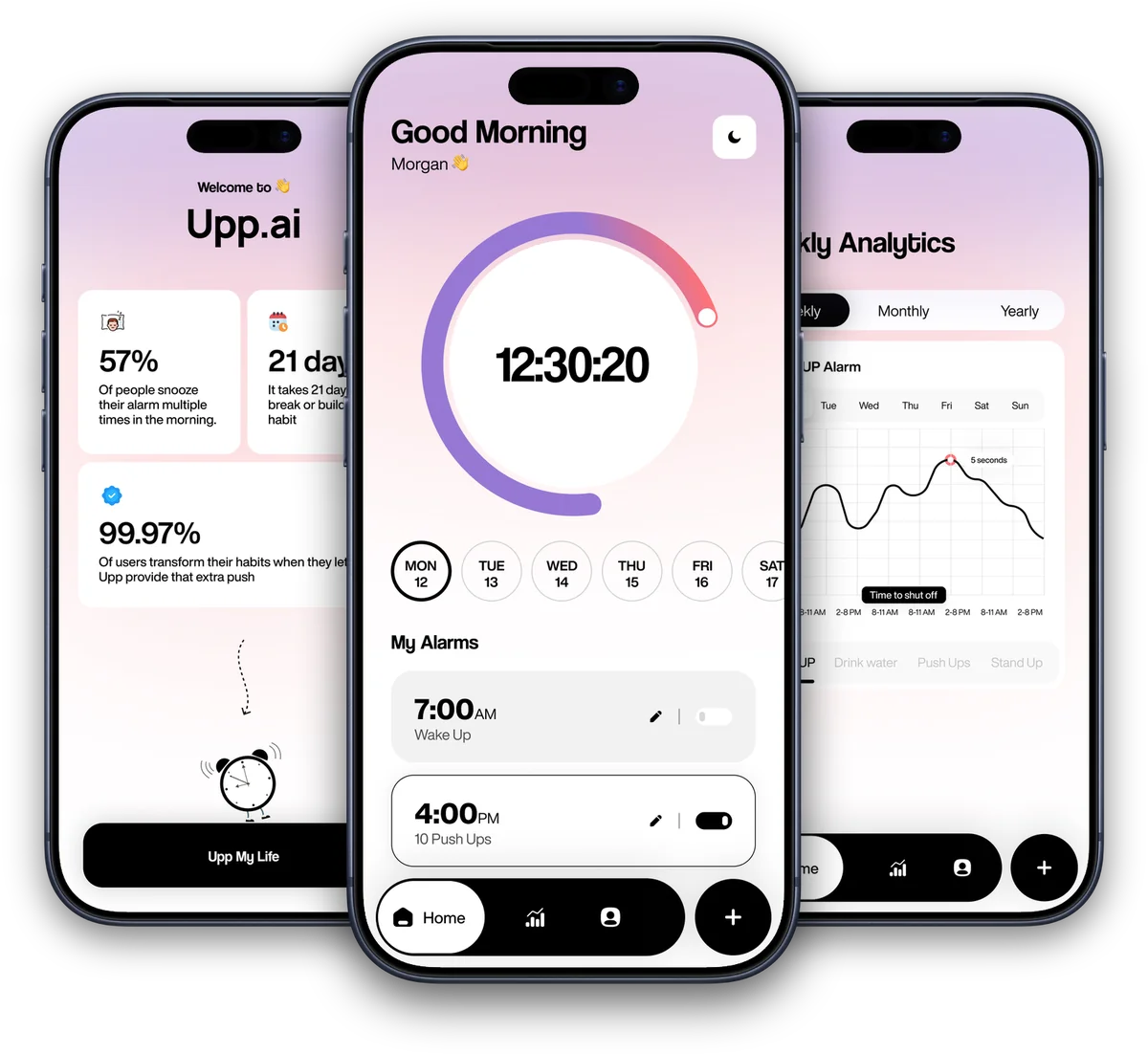
Smart alarm app
Upp.ai. An alarm that stops only when you're up.
How does the app connect to my business software?
Yes. The app talks to the same backend as your dashboard, so orders, payments, bookings and chat match everywhere. It can take payments, handle bookings, chat and push notifications, use the camera and voice, and add AI assistants or agents inside the app. Upkeep's app, for example, connects to its operations software, payments and FedEx.
What should you know before we start?
Store review is Apple's and Google's decision, so we cannot promise approval dates. You need your own Apple and Google developer accounts, which we can help set up, and those fees and cloud hosting are separate costs. Some phone-only features, like haptics or the camera, behave differently in a browser.
- You need your own Apple and Google developer accounts. We can help set them up.
- Store review is Apple's and Google's decision, so we cannot promise approval dates.
- Developer-account fees and cloud hosting are separate costs.
- Some phone-only features, like haptics and the camera, behave differently or are unavailable in a browser.
- Very specialised hardware features may need extra platform code. We say so in planning.
Questions we get asked
Do I need separate apps for iPhone and Android?
No. With a hybrid build we write one codebase that runs on iPhone, Android and the web. You pay for one build instead of three, test one product, and release updates to every platform together. Your customers get the same features whichever phone they hold, and the app still feels native on each.
What is the difference between hybrid and native apps?
A native app is written separately for each platform, usually costing more and taking longer. A hybrid app uses one codebase for all of them. With Flutter, the interface is drawn at native speed, so most business apps feel identical to native. Rare, very hardware-specific features may need extra platform code.
Can the same app run on the web too?
Yes. The same Flutter code can run in a browser, so customers without the app installed can still use it. Which features suit the web is decided in planning. Some phone-only features, like the camera or haptics, behave differently or are unavailable in a browser.
Who publishes the app to the App Store and Google Play?
We do. The app is App Store ready: we prepare builds, listing text and screenshots, submit them, and answer review feedback. You need your own Apple and Google developer accounts, which we can help set up. Store review is Apple's and Google's decision, so we cannot promise approval dates.
What does haptic feedback add to an app?
Haptics are the small, precise vibrations you feel when you tap, swipe or confirm something. They make an app feel responsive and finished. We add haptic feedback to every tap and tune the animations by hand, so the app feels as polished as the best apps on the phone.
Can the app connect to my existing software or AI agents?
Yes. Apps we build talk to the same backend as your dashboard, so orders, payments, bookings and chat match everywhere. Upkeep's app, for example, connects to its operations software, payments and FedEx. We can also add AI assistants and agents inside the app.
How long does it take and what does it cost?
It depends on the features, so we scope each app first. After a free call you get a plan and a quote. We do not promise fixed dates before the screens and features are agreed. Developer-account fees and cloud hosting are separate costs.
Can you maintain the app after launch?
Yes. We fix bugs, update the app for new iOS and Android versions, and add features as your business grows. Maintenance is agreed with you separately, with defined limits for support and changes, rather than as an open-ended promise. Hosting is a separate cost.
One app. Every phone.
Book a free call. Tell us what the app should do, and we sketch it with you: screens, platforms and what to build first.
Build my project