Super Agent Team: an AI chief of staff on WhatsApp

Founders spend the day between email, LinkedIn, WhatsApp, Slack, calendar and CRM. We designed an AI team you run from one WhatsApp chat: a director, four managers and their specialists.

Client
Founders, consultants and busy owners
Industry
Any
What we built
Multi-agent system design
Channel
WhatsApp
The Super Agent Team planning board: an AI director with four AI manager teams, shown on a laptop
This is a planning board, the design of the team. It is not a screen recording, and we do not claim every agent is live. Updated 9 November 2026

What is the Super Agent Team?

We designed an AI team you run from WhatsApp. You send one voice or text message to an AI director, and it hands the work to four managers who handle your messages, projects, research and content. This page shows the design, drawn as a planning board.

What problem is the Super Agent Team meant to solve?

Founders and consultants jump between email, LinkedIn, WhatsApp, Slack, calendar, CRM, notes and content posting. New leads arrive and wait for someone to research them and reply. The goal is a chief of staff that takes one instruction and does the legwork across all of those tools.

What we designed

A team shaped like a small company. From the planning board.

The design

One message. One director.

A voice note or text on WhatsApp goes to an executive director agent, which hands out the work.

Org chart of an AI director with four AI manager teams for communication, projects, research and content
Managers

4managers.

Communication, project, research and content.

Specialists

~17specialists.

Counted from the board.

Triggers

Starts from WhatsApp or a schedule.

Three planned triggers on the board.

Built on

Relevance AI and Make.

How does one WhatsApp message become finished work?

You send a voice note or text. The director reads it, decides which managers are needed and gives each a task. Each manager runs its specialists, which use real tools. The results go back up to the director, who checks them and replies on WhatsApp. Scheduled triggers can start the same chain.

  1. You messageVoice note or text on WhatsApp
  2. Director splits itInto jobs for the managers
  3. Managers and specialistsUse calendar, inbox, CRM, search
  4. Director checksAnd replies on WhatsApp

What does each manager handle?

Communication, projects, research and content. Each manager has its own specialists, and the director checks their work. The counts below come from the planning board, which shows about 17 specialists in all.

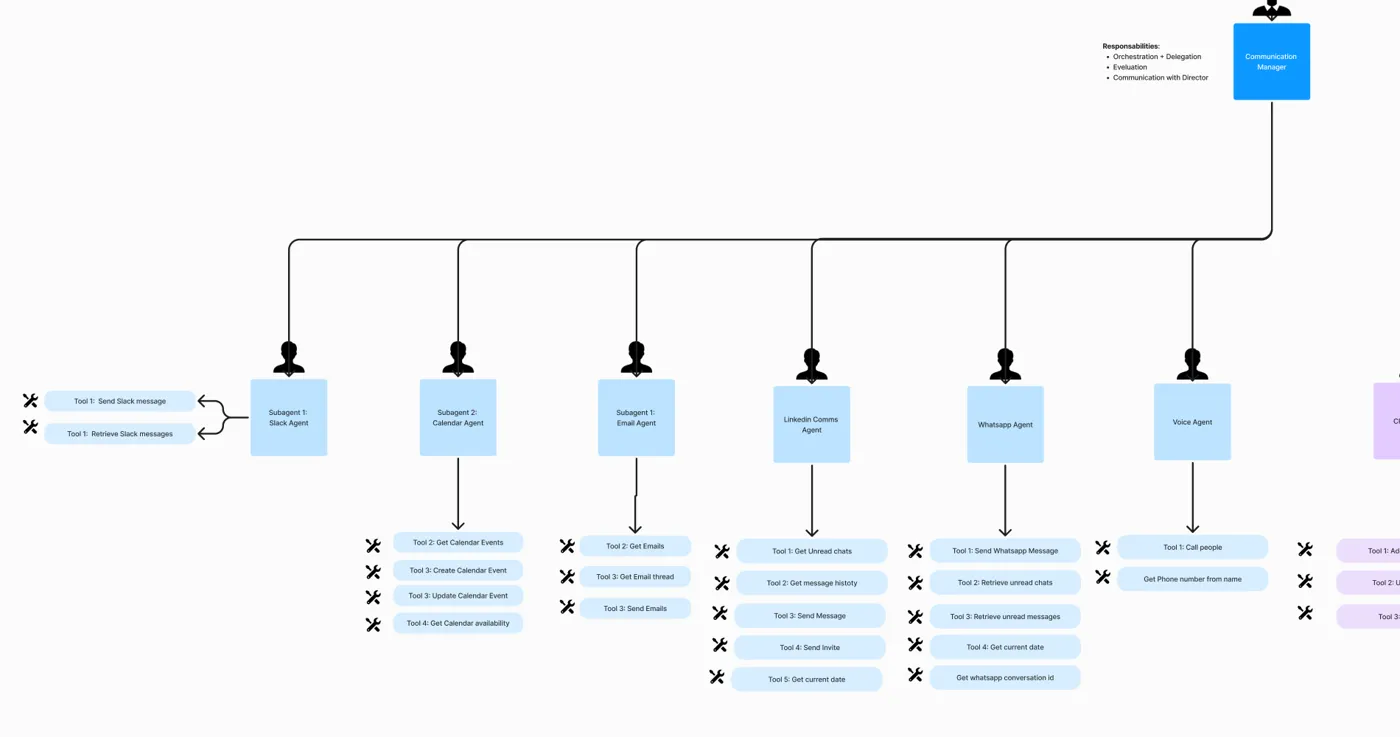
  • Communication Manager. Slack; Calendar (read, create, update, check availability); Email (read, reply, send); LinkedIn messages (unread chats, send, invite); WhatsApp (send, read unread); and a Voice agent that can phone people.
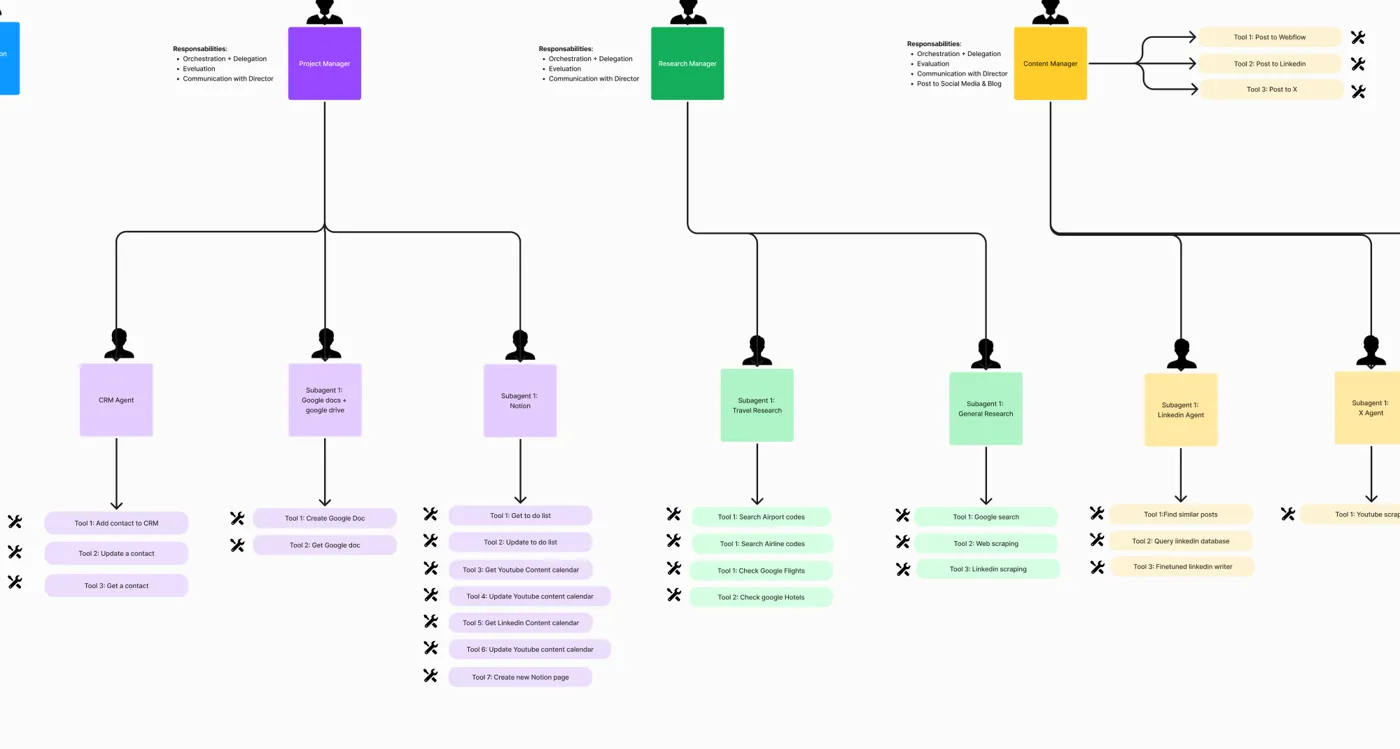
  • Project Manager. A CRM agent (add, update, get contacts), a Google Docs and Drive agent (create and fetch documents) and a Notion agent (to-do list, content calendars, new pages).
  • Research Manager. A travel agent (airports, airlines, flights, hotels) and a general research agent (Google search, web pages, LinkedIn profiles).
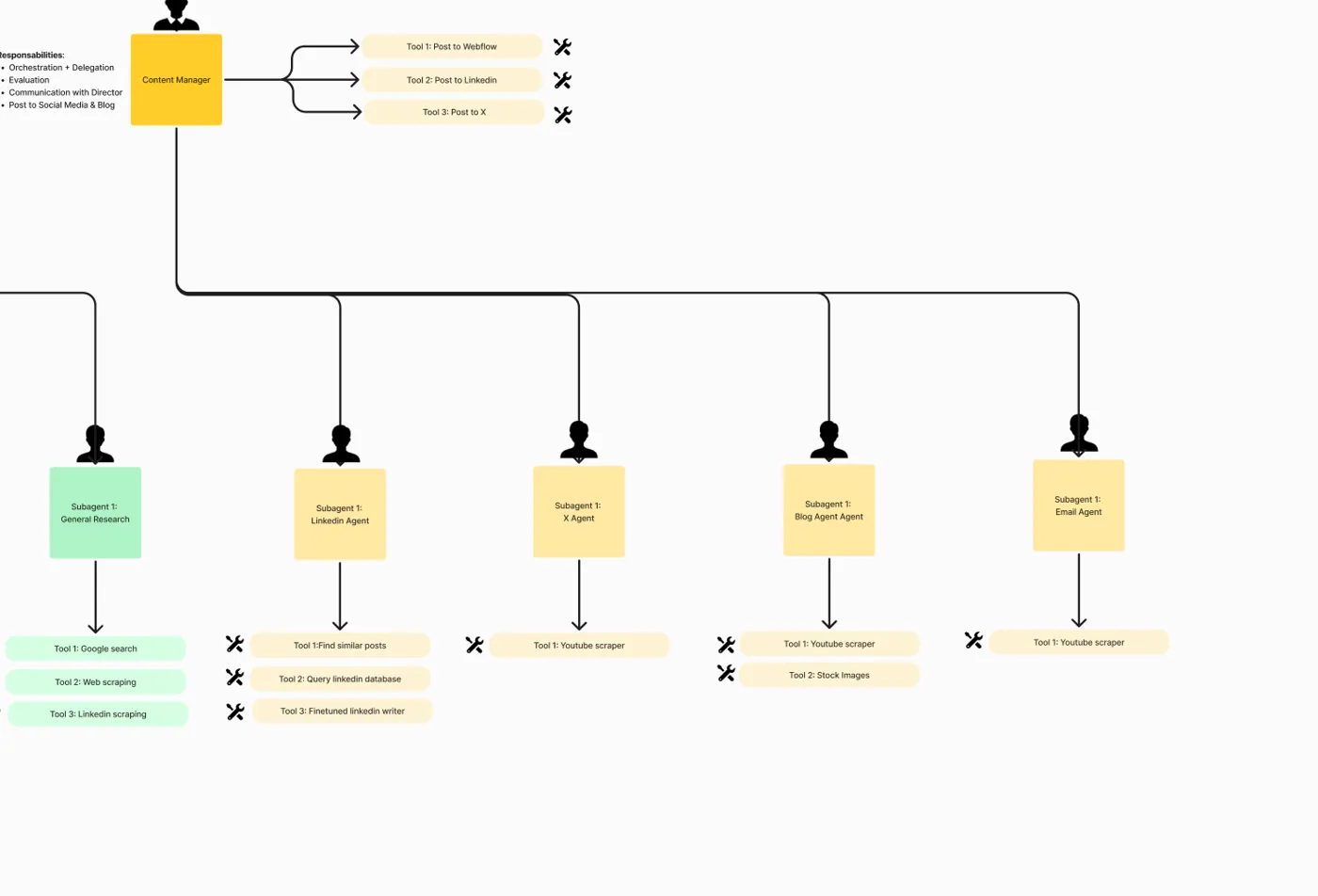
  • Content Manager. LinkedIn, X, blog and email writers, including a LinkedIn writer tuned on past posts, plus a YouTube scraper and stock images for blogs. It can post to LinkedIn, X and a Webflow blog.

The planning board

Crops of the board, team by team. Keep scrolling to see more.

Planning board crop: the Communication Manager with its Slack, Calendar, Email, LinkedIn, WhatsApp and Voice agents
Communication teamSlack, calendar, email, LinkedIn, WhatsApp, voice
Planning board crop: the Project Manager with CRM, Google Docs and Notion agents, and the Research Manager with travel and research agents
Project and research teamsCRM, documents, Notion, travel, research
Planning board crop: the Content Manager with LinkedIn, X, blog and email writers
Content teamLinkedIn, X, blog and email writers

Is the Super Agent Team live?

This page shows a design. The source is a planning board, not a screen recording, so we do not say every agent is live and we publish no results, hours saved or lead counts. Two of the five trigger boxes on the board are still blank.

Which tools and channels are involved?

The board shows the agents built on Relevance AI, with the automations on Make. It plans connections to Slack, Google Calendar, email, LinkedIn, WhatsApp, voice calls, a CRM, Google Docs and Drive, Notion, Google Search, web scraping, YouTube, X and Webflow.

WhatsAppRelevance AIMakeSlackGoogle CalendarEmailLinkedInCRMNotionGoogle Docs and DriveWebflowX

Questions about the Super Agent Team

What is the Super Agent Team?

A set of AI agents arranged like a small company: one director, four managers and about 17 specialists, controlled from one WhatsApp chat. It is a planning board and system design, not a finished product.

What can it do for me?

Read and answer messages, manage your calendar, update your CRM and notes, research people, trips and topics, and draft and post content to LinkedIn, X and a blog.

Which tools does it connect to?

The board shows Slack, Google Calendar, email, LinkedIn, WhatsApp, voice calls, a CRM, Google Docs and Drive, Notion, Google Search, web scraping, YouTube, X and Webflow. We connect the tools you actually use.

Can I build one for my business?

Yes. We scope it around your tools and rules, such as what the agents may send on their own and what needs your approval first.

Want an AI team that runs from your chat?

Book a free call. We scope the team around your tools and rules, including what needs your approval first.

Build my project